In December 2021, the Log4Shell vulnerability (CVE-2021-44228) became one of the most critical security incidents in recent history. Organizations scrambled to find which systems were vulnerable, running emergency scans across their infrastructure.
Here's what happened in many environments:
Unauthenticated scans reported: "Apache web server detected - potentially vulnerable"
Authenticated scans revealed: "Log4j version 2.14.1 confirmed in 47 Java applications across production - actively exploitable"
The difference between these two results? Access to the system.
If you've ever wondered why your vulnerability scanner shows different results with and without credentials, or questioned whether you actually need to configure authentication, this guide will answer every question.
We'll cover what each method detects, when to use which approach, how to set them up correctly, and what you're missing if you skip authenticated scanning.
What Is Authenticated vs Unauthenticated Scanning?
Unauthenticated Scanning: The External View
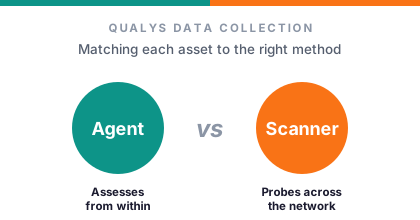
Unauthenticated scanning (sometimes called "non-credentialed" or "agentless network scanning") probes your systems without logging in.
When performing unauthenticated scans, the scanner:
- Sends network packets to discover open ports
- Identifies running services based on their responses
- Attempts to determine software versions from banner information
- Matches observed behavior against known vulnerability patterns
Unauthenticated scanning can detect:
- Open ports and exposed services
- Outdated SSL/TLS configurations
- Known vulnerabilities in service banners (e.g., "Apache 2.4.49")
- Network-level misconfigurations
- Missing security headers on web services
Unauthenticated scanning cannot detect:
- Installed software
- Missing patches
- Local configuration weaknesses
- File permission issues
Authenticated Scanning: The Internal Perspective
Authenticated scanning (also called "credentialed scanning") logs into systems using credentials.
When performing authenticated scans, the scanner:
- Authenticates via SSH (Linux/Unix/Network devices) or WMI/SMB (Windows)
- Reads installed software packages and versions directly from the system
- Checks patch levels against OS databases
- Inspects configuration files for security issues
- Examines registry settings (Windows)
- Verifies file permissions and ownership
Authenticated scanning detects (in addition to unauthenticated findings):
- Exact software versions (not guessed from banners)
- Missing operating system patches
- Installed applications with known vulnerabilities (even if not running)
- Local privilege escalation vulnerabilities
- Weak password policies
- Insecure service configurations
- End-of-life software
- Compliance violations (CIS benchmarks, STIG requirements)
This distinction between authenticated and unauthenticated scan matters enormously for:
- Patch validation: Did that emergency patch actually get applied?
- Compliance audits: Can you prove all systems are hardened per CIS benchmarks?
- Incident response: Which systems are definitely vulnerable vs. possibly vulnerable?
Complete Comparison
We scanned a Ubuntu server twice - once without credentials, once with credentials.
Here's what we found:
| Severity | Unauthenticated findings | Authenticated findings |
|---|---|---|
| Critical (5) | 0 | 3 |
| High (4) | 2 | 5 |
| Medium (3) | 11 | 5 |
| Low (2) | 7 | 5 |
| Minimal (1) | 0 | 0 |
| Finding type | Unauthenticated findings | Authenticated findings |
|---|---|---|
| Confirmed | 2 | 16 |
| Potential | 18 | 2 |
| Informational | 26 | 116 |
| Total findings | 46 | 134 |
Without authentication, you get nearly 3x fewer findings, and 6 critical/high severity vulnerabilities remain completely invisible.
We also scanned a Windows server and here are the findings:
| Severity | Unauthenticated findings | Authenticated findings |
|---|---|---|
| Critical (5) | 1 | 1 |
| High (4) | 0 | 1 |
| Medium (3) | 4 | 5 |
| Low (2) | 5 | 10 |
| Minimal (1) | 0 | 1 |
| Finding type | Unauthenticated findings | Authenticated findings |
|---|---|---|
| Confirmed | 8 | 14 |
| Potential | 2 | 4 |
| Informational | 41 | 195 |
| Total findings | 51 | 213 |
Without authentication, you get over 4x fewer findings.
The additional 154 information items (installed software, service pack levels, running services) are critical for understanding your true attack surface and meeting audit requirements.
| Aspect | Unauthenticated scanning | Authenticated scanning |
|---|---|---|
| Coverage | Typically, less than 70% of all vulnerabilities | 95%+ of all vulnerabilities |
| Accuracy | Moderate - high volume of findings requiring manual investigation | Very high - mostly confirmed vulnerabilities |
| Scope | Network-facing or remotely-detectable vulnerabilities only | External + internally visible vulnerabilities |
| Setup complexity | None - point and scan | Moderate - credential management required |
| Maintenance | None - zero ongoing effort | Moderate - credential management required |
| Compliance value | Limited (not useful for most audits) | Required for most audit assessments |
| Patch verification | Cannot verify installed patches | Confirms exact patch levels |
| Configuration assessment | No visibility | Full visibility into misconfigurations |
Real-World Impact: What You're Missing
Example 1: Log4Shell (CVE-2021-44228) - Partial Visibility
The Vulnerability: Remote code execution in Apache Log4j library, affecting thousands of Java applications. CVSS - 10.0
Unauthenticated Scan Results:
Authenticated Scan Results:
- /opt/application/lib/log4j-core-2.14.1.jar
- /usr/share/java/log4j-core-2.14.1.jar
- /home/appuser/webapp/WEB-INF/lib/log4j-api-2.14.1.jar
What Happened in the Real World:
Within days of disclosure in December 2021:
- Belgian Ministry of Defence breached, forced to shut down part of network (Source)
- Canada Revenue Agency shut down online services, Quebec closed 4,000 websites as preventative measure (Source)
- Conti ransomware group leveraged Log4Shell to mount attacks (Source)
- Within 72 hours, over 800,000 exploit attempts recorded, with 48% of corporate networks globally seeing attempted exploitation (Source)
- 93% of cloud environments were vulnerable, only 45% patched within 10 days (Source)
Why Organizations Struggled:
Unauthenticated scans reported "maybe vulnerable" - not actionable intelligence.
Security teams had to:
- Manually search thousands of servers for Log4j JAR files
- Check application dependencies one by one
- Hunt through container images and virtual machines
Organizations with authenticated scanning:
- Immediately identified ALL vulnerable Log4j instances
- Knew exact file locations and versions
- Prioritized based on confirmed exposure
- Verified successful patching
The difference: "Maybe vulnerable" vs "Definitely vulnerable with exact locations."
Example 2: PrintNightmare (CVE-2021-34527) - Complete Invisibility
The vulnerability: Remote code execution in Windows Print Spooler service. Service is enabled by default on all Windows clients and servers, including domain controllers.
Unauthenticated Scan Results:
- Is Print Spooler service running?
- Is the system patched?
- Are registry settings vulnerable?
- Is Point and Print enabled?
Authenticated Scan Results:
- Service query confirmed spoolsv.exe running
- Missing KB5004954
What Happened in the Real World:
- Microsoft confirmed exploitation in the wild
- Magniber ransomware group leveraged PrintNightmare to breach Windows systems, mainly in South Korea
PrintNightmare cannot be detected from the network. There's no:
- Port to scan
- Banner to read
- Service response to analyze
Without authenticated scanning, you have zero visibility into:
- Which systems have Print Spooler running
- Which systems are patched
Organizations with authenticated scanning:
- Immediately identify all systems with Print Spooler enabled
- Verified patch status across the entire environment
- Track remediation progress
The difference: Complete blindness vs complete visibility.
When to Authenticate?
Use authenticated scanning whenever you have credentials.
Authenticated scans include all the unauthenticated checks (SSL/TLS, certificates, network services) plus system-level verification (patches, configs, installed software).
Only run unauthenticated-only scans when:
- You don't have credentials (external assets, third-party systems)
- Compliance requires it (PCI DSS external quarterly scans)
What Credentials to Use?
Linux/Unix:
- Don't use root
- Use a non-root account with sudo privileges or specific permissions to read packages and configs
Windows:
- Local Administrator or domain account with Administrator rights
- For better security, use a service account without interactive login permissions
Network Devices:
- SSH account with read access to running configuration
Final Thoughts
The bottom line: Enable authenticated scanning where possible - on servers, workstations, and any system where you can provide credentials.
It's the difference between guessing and knowing.